Snake Game
A retro arcade classic, right in your chat! Snake challenges you to navigate a growing snake around a digital board, eating fruit to increase your score without crashing.
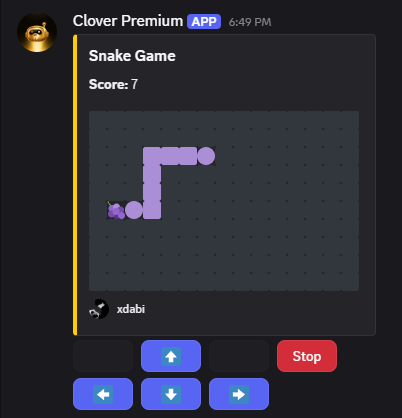
Instead of typing, you control the snake entirely using interactive Discord buttons for up, down, left, and right. The longer you survive and the more food you eat, the higher your score climbs!
Objective: Use the arrow buttons to guide the snake to the food, grow your tail, and rack up a high score without hitting the walls or yourself.
🕹️ How to Play
-
Start the Game: Use the command below to spawn a new arcade session.
usernameToday at 10:29 PM.snake -
Navigate: Use the blue directional arrow buttons (⬆️, ⬇️, ⬅️, ➡️) attached to the message to steer the snake.
-
Eat: Guide the snake's head to the fruit emoji (like a grape) on the grid to earn points and grow longer.
-
Finish: The game continues until you crash into a wall, bite your own tail, or click the red Stop button.

You cannot run more than one Snake game in the same channel at the same time. You must wait for the current session to end before starting a new one.
⚡ Game Rules
- ⏱️ Time Limit: None! Play until you crash or hit Stop.
- 🏆 Reward: Variable points (The points you earn depend on your final score).
- 🎮 Input Type: Clicking Buttons (Arrows and Stop).
Plan ahead! Because Discord buttons have a slight interaction delay, you need to click your turns slightly earlier than you would in a native game. Anticipate your moves to avoid crashing!